SPLITWISE REDESIGN

Description
Description

Interaction Design

App Case Study

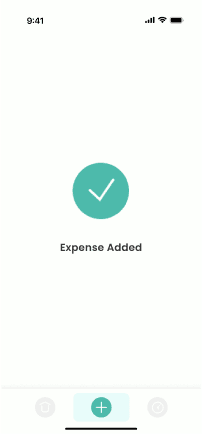
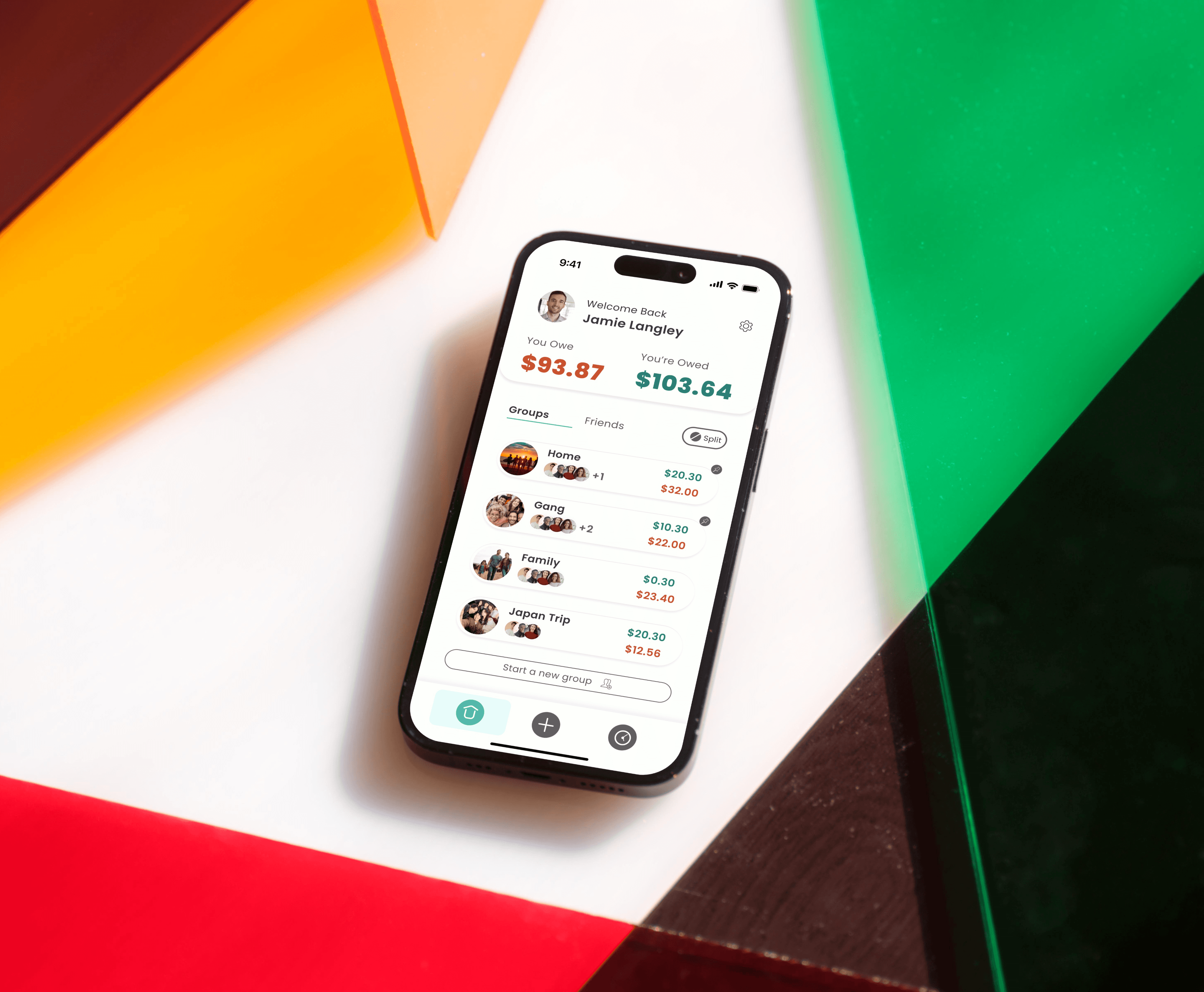
I undertook a redesign of a well-known group expense-splitting app, aiming to streamline its user flow and modernise its visual style. The project followed my A to D design process—Analyse, Design, Develop, Deliver—starting with user pain points and ending with a refined, intuitive interface. I focused on simplifying navigation, reducing cognitive load, and implementing a more cohesive and accessible colour scheme. The result is a clean, user-friendly prototype that demonstrates both my UX thinking and UI craft. This case study highlights my ability to identify usability issues and translate insights into effective design improvements using industry-standard tools.

I undertook a redesign of a well-known group expense-splitting app, aiming to streamline its user flow and modernise its visual style. The project followed my A to D design process—Analyse, Design, Develop, Deliver—starting with user pain points and ending with a refined, intuitive interface. I focused on simplifying navigation, reducing cognitive load, and implementing a more cohesive and accessible colour scheme. The result is a clean, user-friendly prototype that demonstrates both my UX thinking and UI craft. This case study highlights my ability to identify usability issues and translate insights into effective design improvements using industry-standard tools.

Credits
Credits

Role

Role

Sole Designer

Sole Designer

Client

Client

Monash University Assignment

Monash University Assignment

Software

Software

Figma

Figma

A

nalyse

B

rainstorm

C

onceptualise

oncept

D

eliver

A

The Problem.
The Problem.

People who want to track expenses with friends, family, or groups often turn to Splitwise for convenience. However, many users feel unsatisfied due to poor colour choices, visual clutter, and limited features—leading not only to frustration with the app but also tension among peers. To stay relevant and competitive, the app requires a refreshed design that is more intuitive, visually clear, and functionally rich.

People who want to track expenses with friends, family, or groups often turn to Splitwise for convenience. However, many users feel unsatisfied due to poor colour choices, visual clutter, and limited features—leading not only to frustration with the app but also tension among peers. To stay relevant and competitive, the app requires a refreshed design that is more intuitive, visually clear, and functionally rich.

The Audience.
The Audience.

Splitwise’s target users include individuals, families, roommates, couples, and groups of friends who need a way to track and manage shared expenses.

Splitwise’s target users include individuals, families, roommates, couples, and groups of friends who need a way to track and manage shared expenses.

The Solution
The Solution
The Solution.

The Goal is to modernise the design, improve accessibility, and enhance the user flow by simplifying pages and split processes.

The Goal is to modernise the design, improve accessibility, and enhance the user flow by simplifying pages and split processes.

The Original UI
Design Analysis

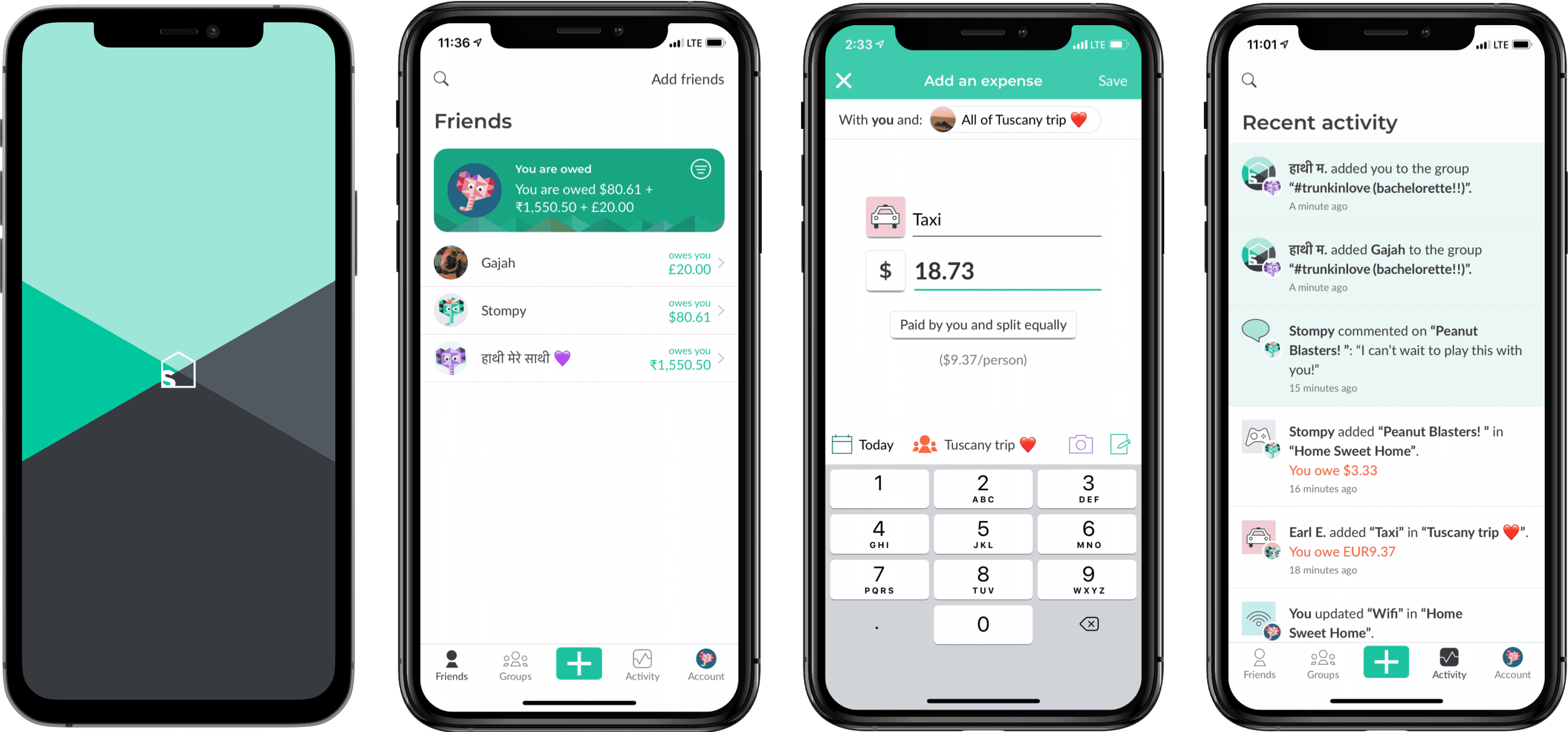
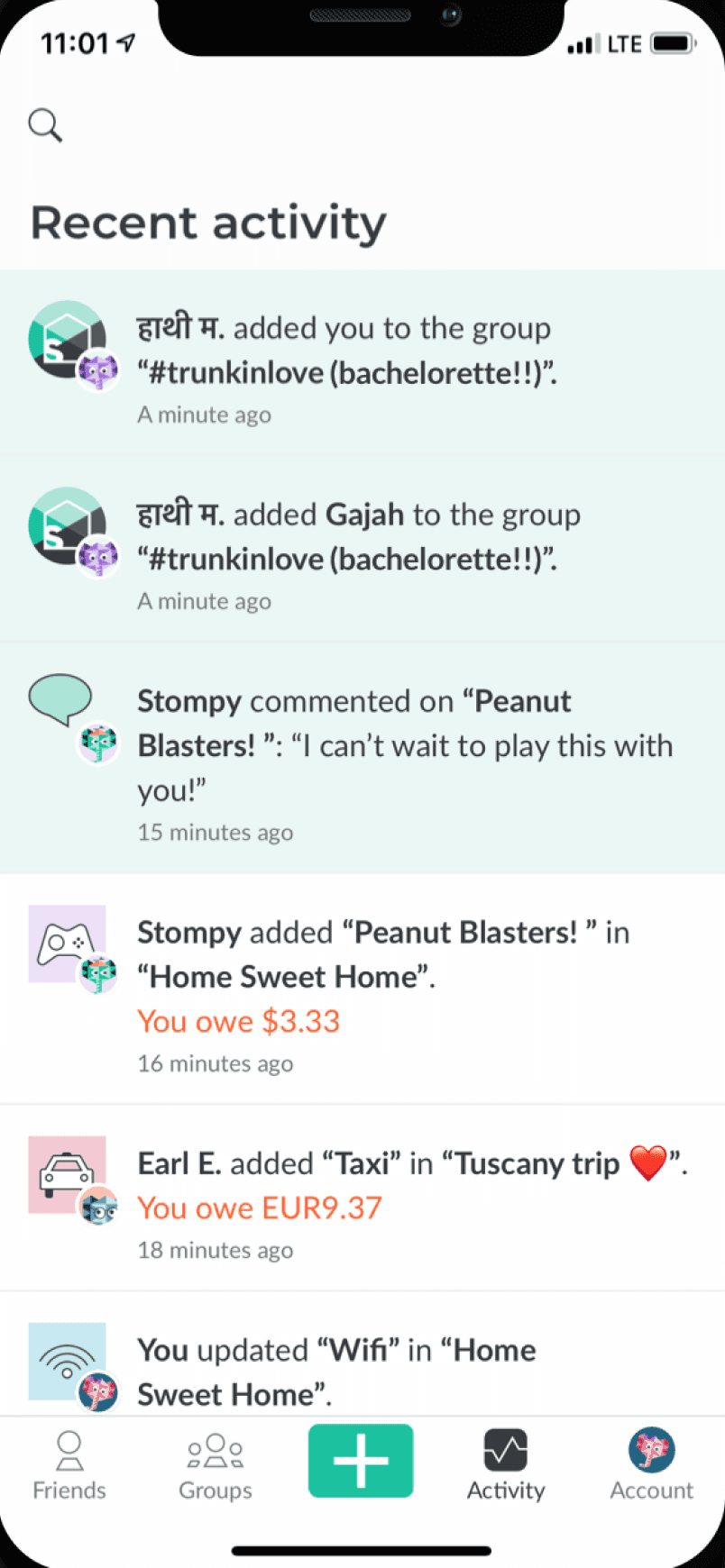
The user flow is clunky, with most screens overloaded with text, resulting in a jarring visual hierarchy. Icons lack consistency, and more critically, the colour palette falls well short of WCAG accessibility standards.
Home Screen

Home Screen

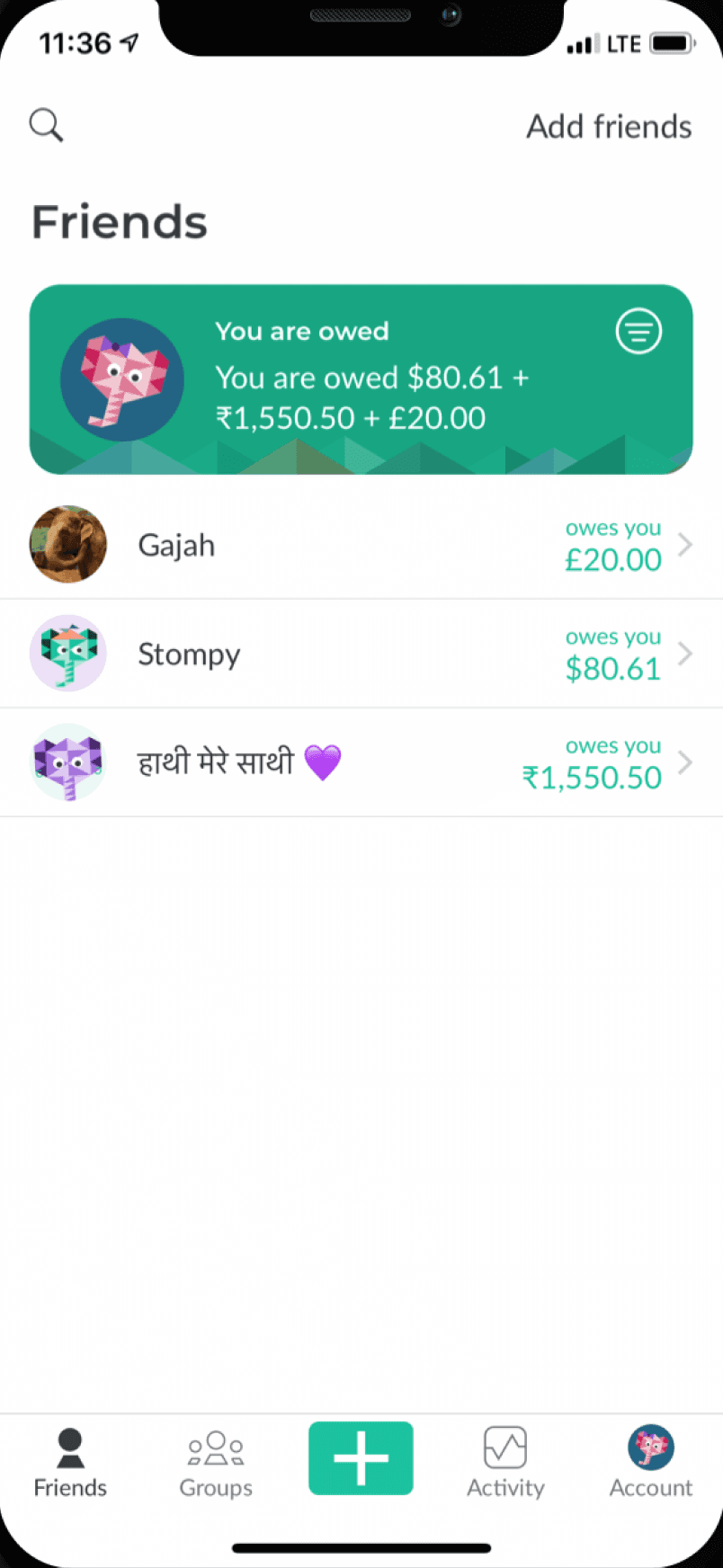
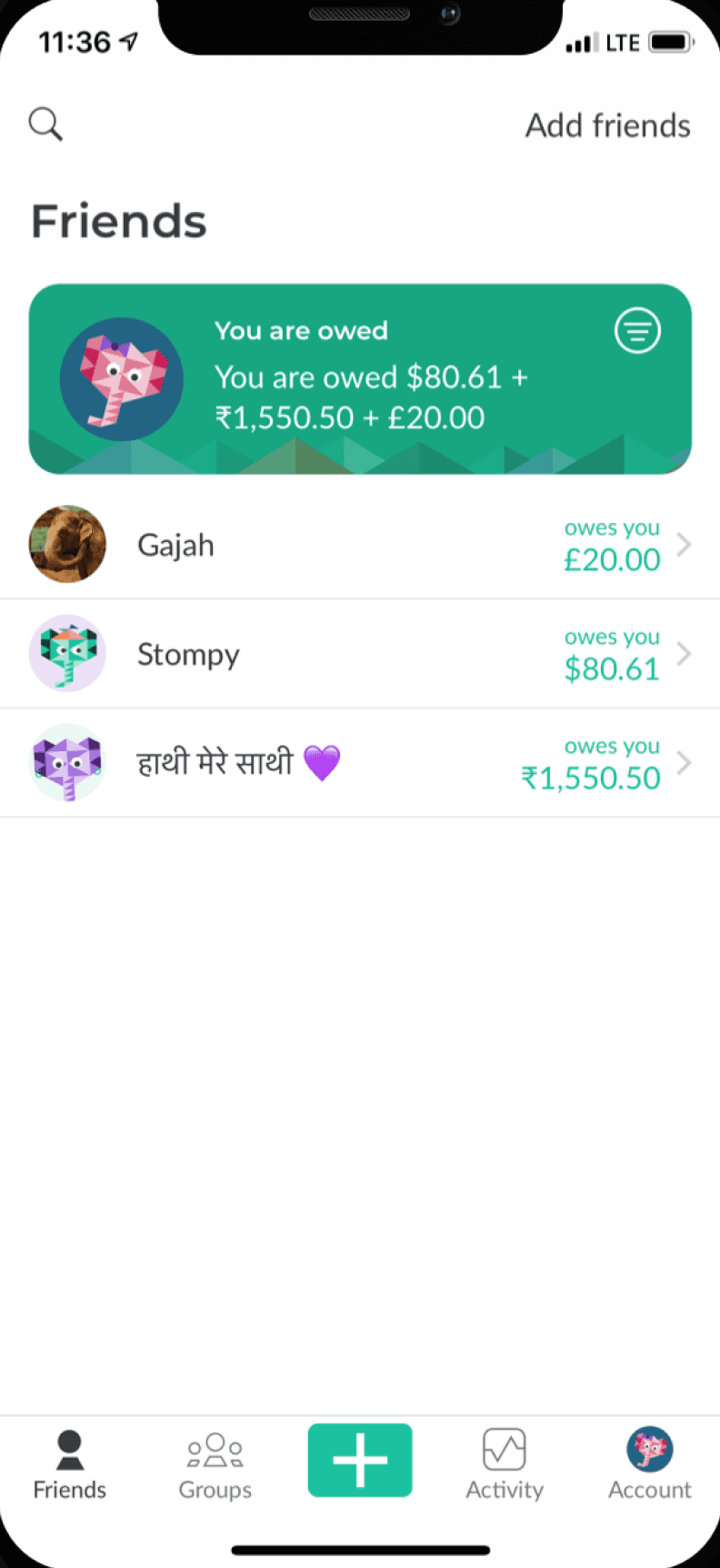
Too text heavy. Hierarchy isn’t clear.

No quick actions.

Wasted space.

Unnecessary buttons, these are not important and overcomplicate the UI.

Too text heavy. Hierarchy isn’t clear.

No quick actions.

Wasted space.

Unnecessary buttons, these are not important and overcomplicate the UI.

Split Expense

Split Expense

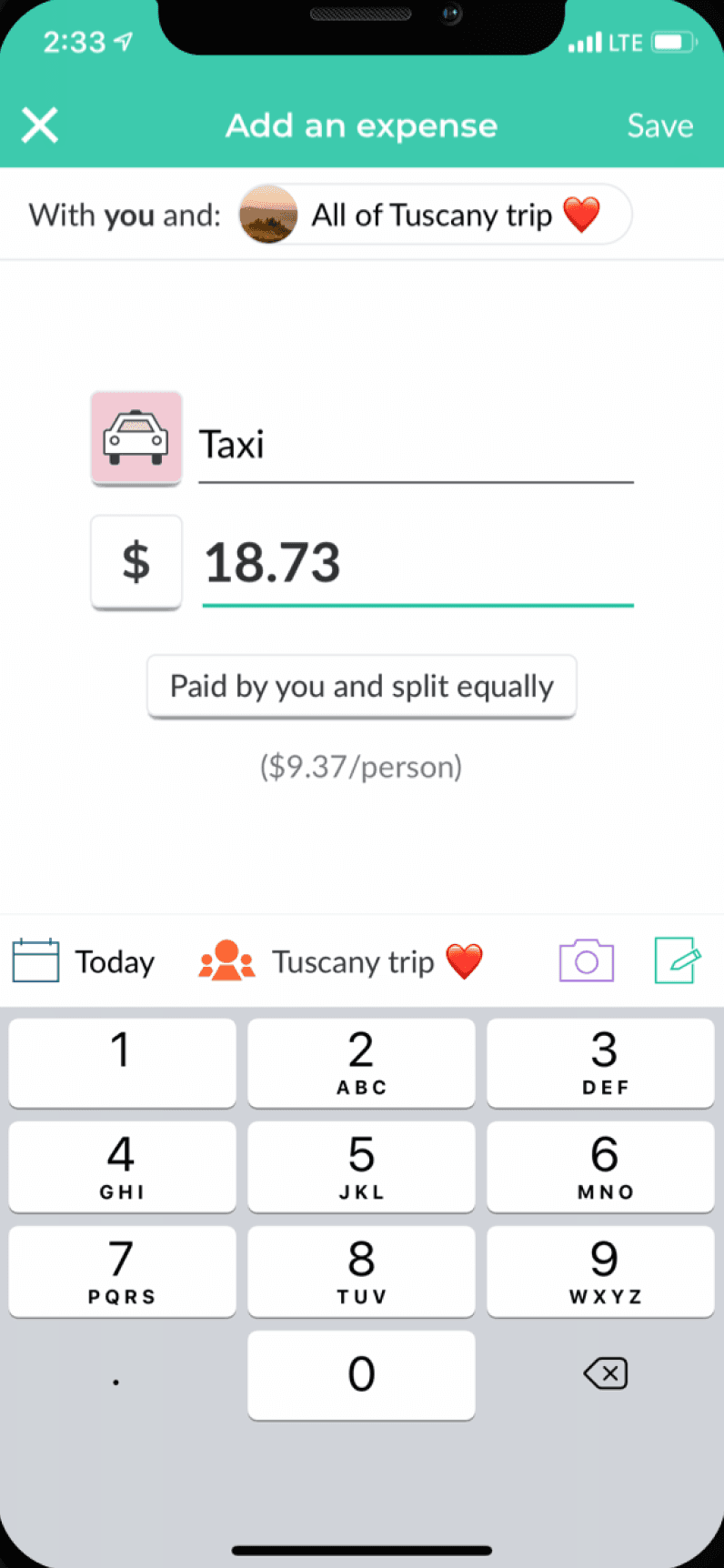
Important buttons are not clear.

Splitting can be inefficient and some features are not robust.

Buttons are hard to notice, they are also inconsistent.

You can't set the actual payment date.

Important buttons are not clear.

Splitting can be inefficient and some features are not robust.

Buttons are hard to notice, they are also inconsistent.

You can't set the actual payment date.

Activity

Activity

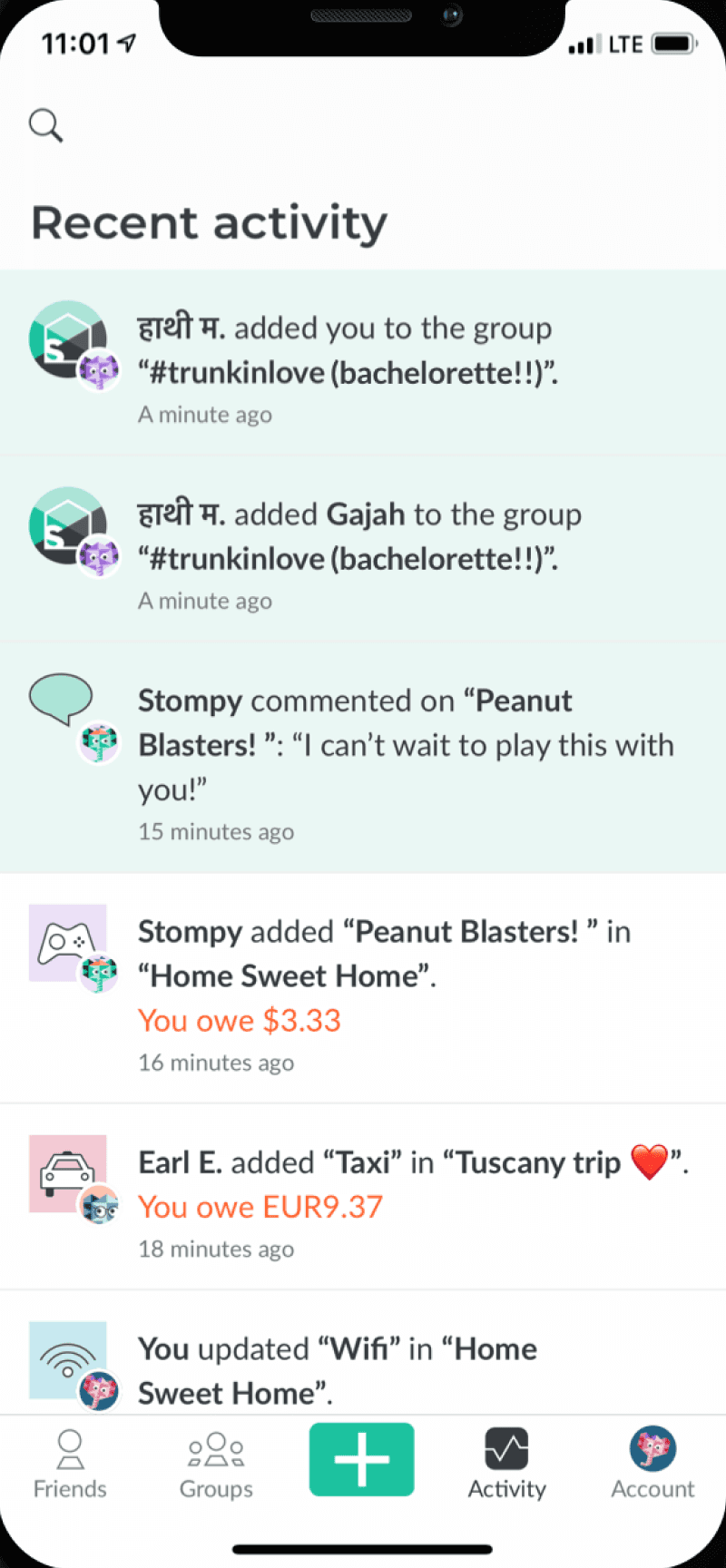
The activity section is confusing.

Text hierarchy is unclear and dense.

No filters.

There aren’t options for recurring payments.

The activity section is confusing.

Text hierarchy is unclear and dense.

No filters.

There aren’t options for recurring payments.

Friend Profile

Friend Profile

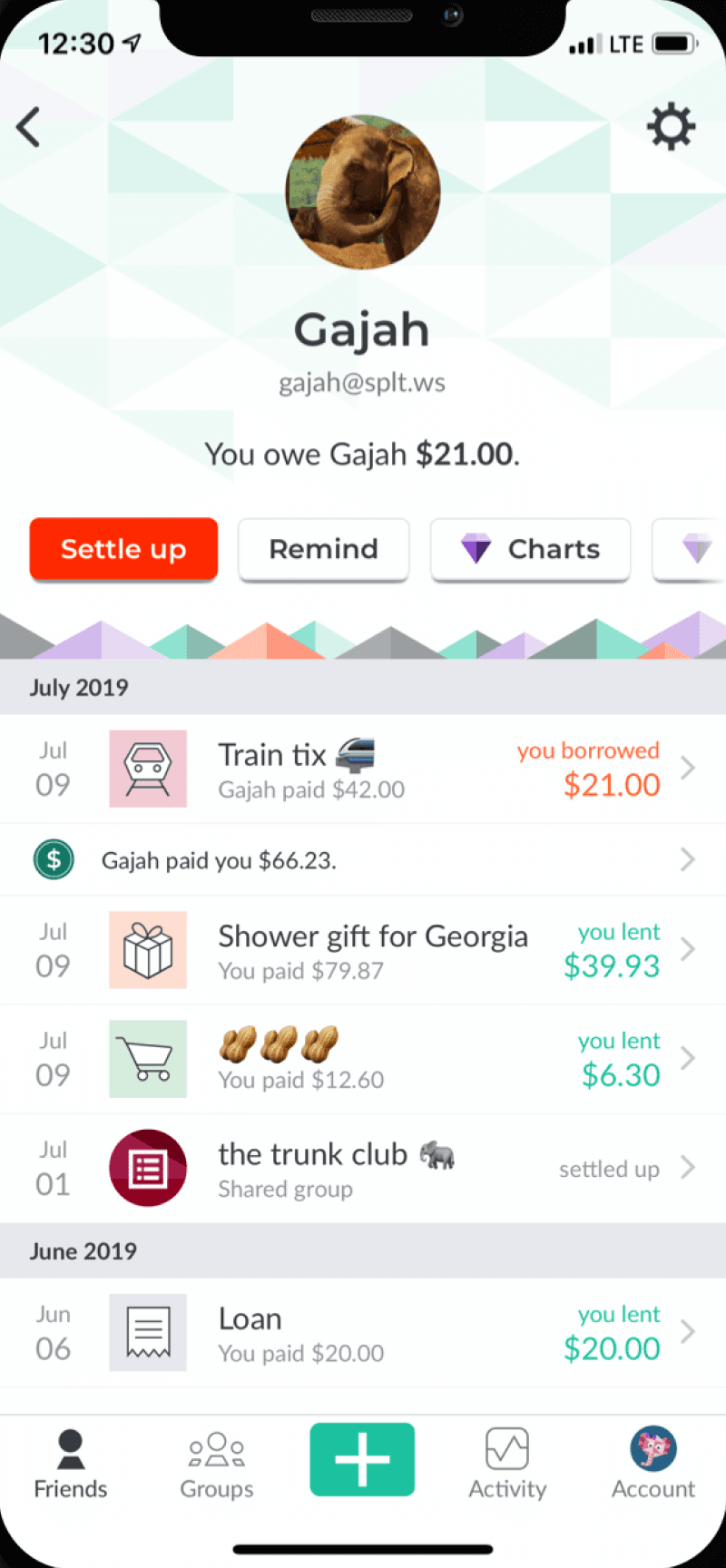
People are able to remove debts completely themselves. This can lead to arguments.

Activity on an individual is easier to read.

Too much text and colour. The overall UI looks cluttered.

People are able to remove debts completely themselves. This can lead to arguments.

Activity on an individual is easier to read.

Too much text and colour. The overall UI looks cluttered.

Colour Scheme

Colour Scheme

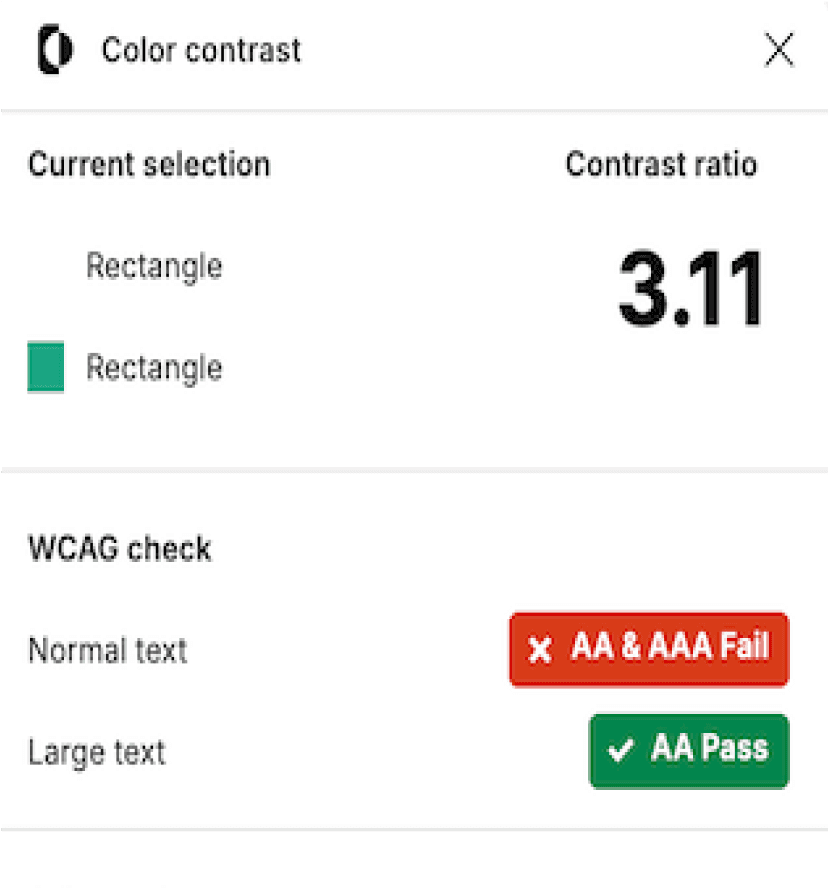
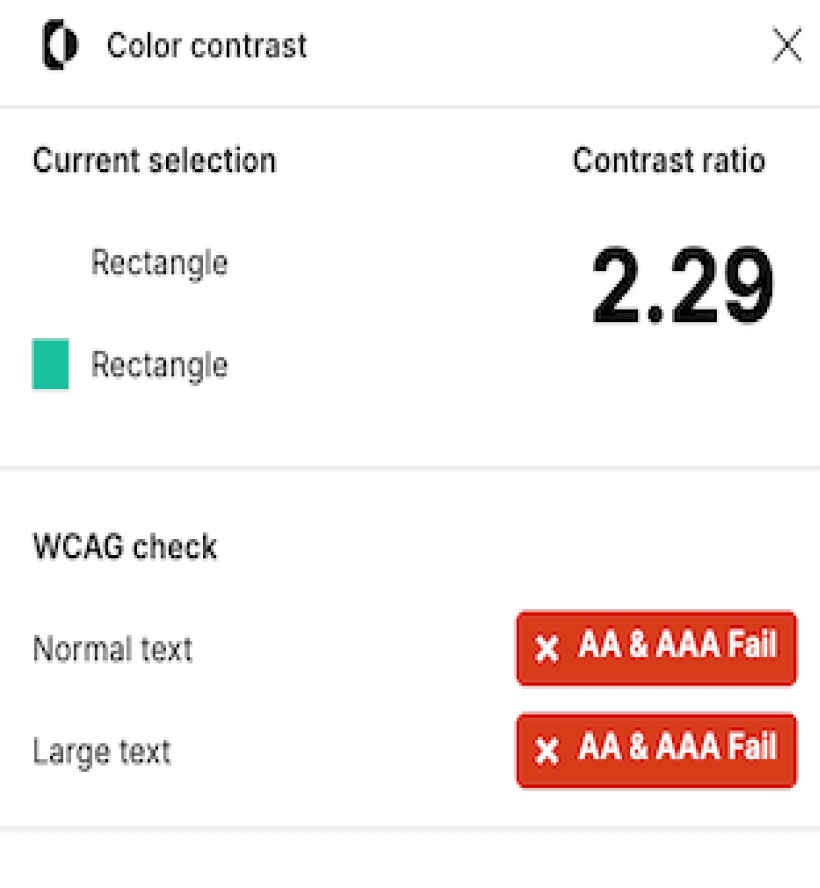
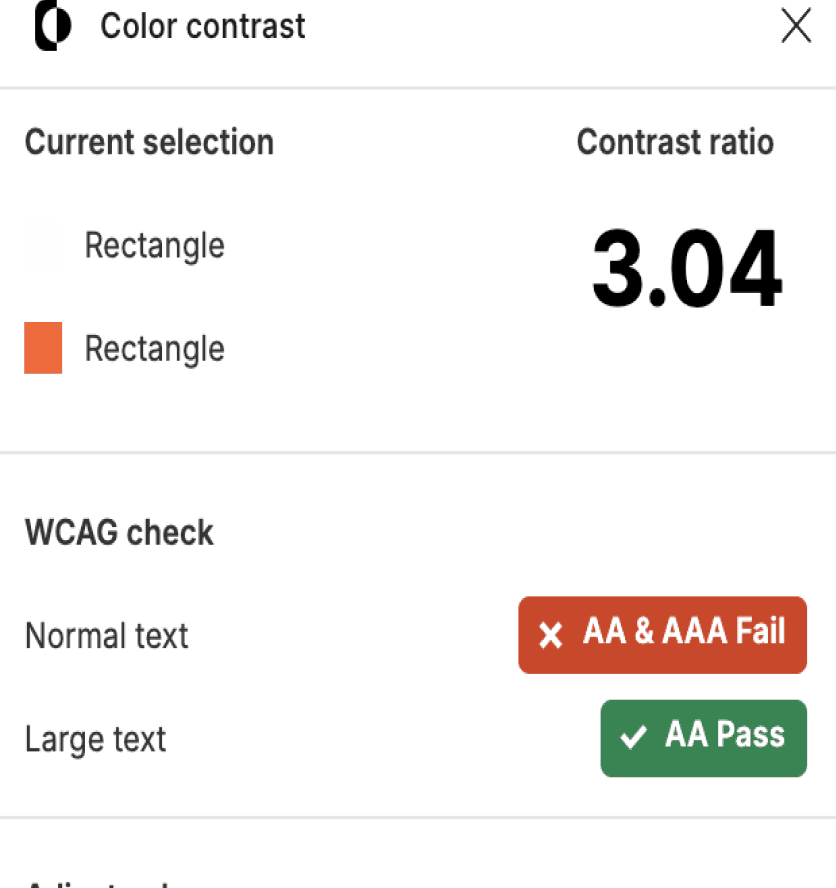
A major issue across all screens is the colour scheme as it fails the accessibility standards for text.

A major issue across all screens is the colour scheme as it fails the accessibility standards for text.

User Research

A study by Nidhibhat on Medium involving 12 participants, combined with several personal reviews and feedback from TrustPilot users, revealed six key insights.


A lack of advanced splitting, it isn’t intuitive and the user has to do a lot of reading to work out their best option.

A lack of advanced splitting, it isn’t intuitive and the user has to do a lot of reading to work out their best option.

The iconography as well as the overall UI has a plain and outdated look. The app isn’t clear and doesn't use strong visual cues.

The iconography as well as the overall UI has a plain and outdated look. The app isn’t clear and doesn't use strong visual cues.

The 3-split-a-day limit

The 3-split-a-day limit

Pro Plan

Pro Plan

In app discussion on splits.

Recurring payments.

In app discussion on splits.

In app discussion on splits.

Recurring payments.

Recurring payments.

Competitive Analysis

What have other companies done successfully that Splitwise has missed?
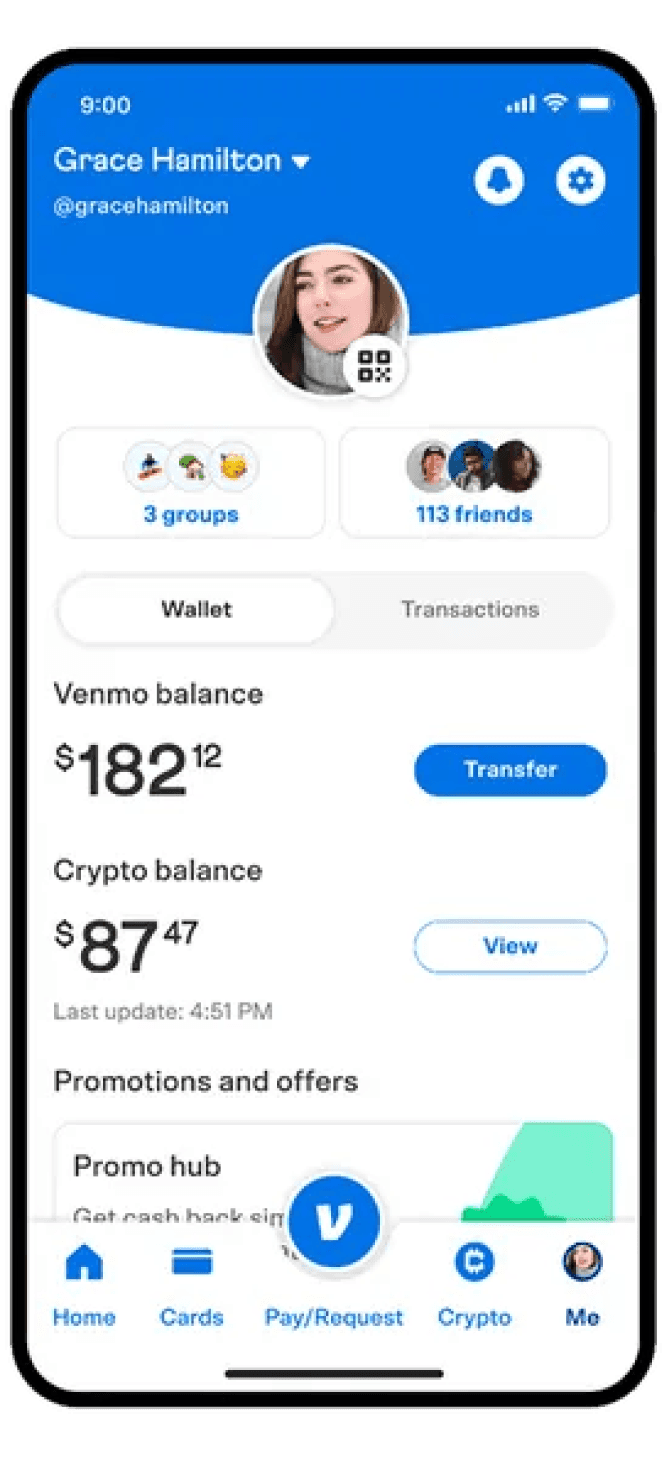
Venmo

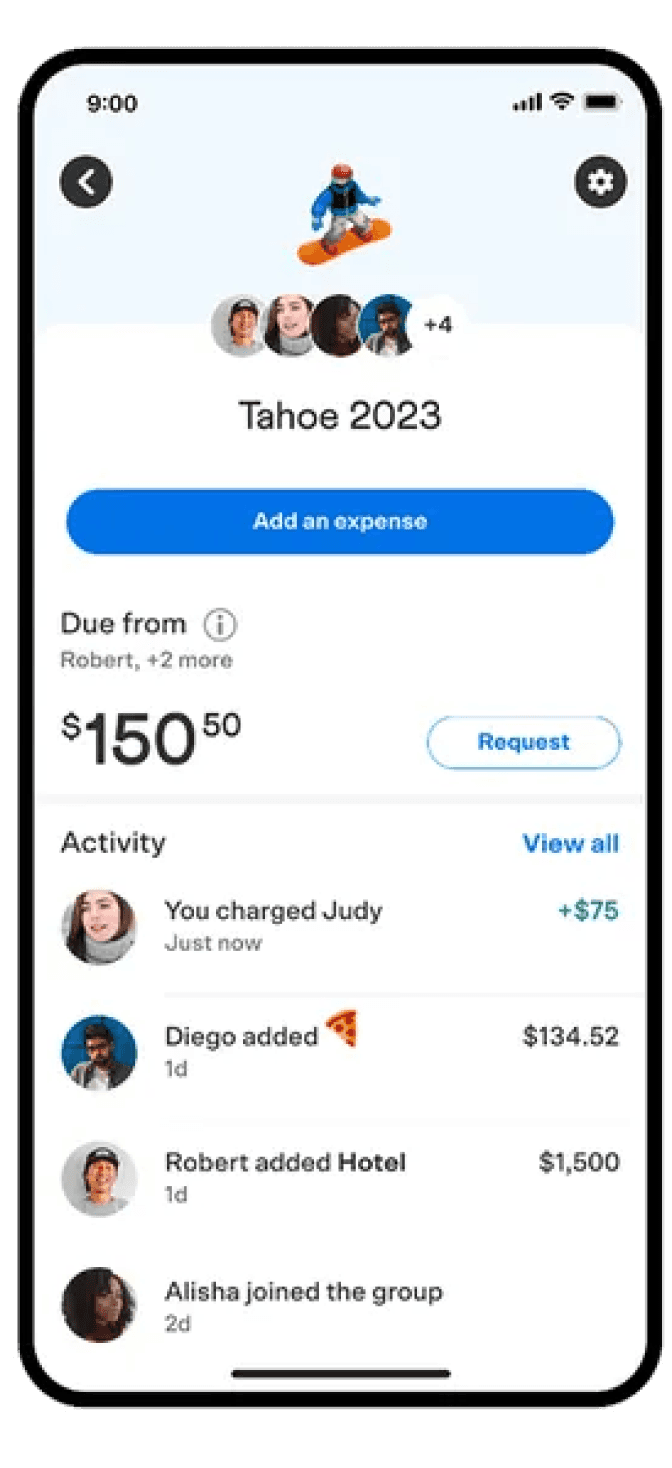
Extremely clean and simple UI. White background, simple colours that meet accessibility standards. Recurring payments, easy split pages, and ability to request payments. Great visual hierarchy, making complicated pages like activity feel easy to read.

Extremely clean and simple UI. White background, simple colours that meet accessibility standards. Recurring payments, easy split pages, and ability to request payments. Great visual hierarchy, making complicated pages like activity feel easy to read.

Settle Up

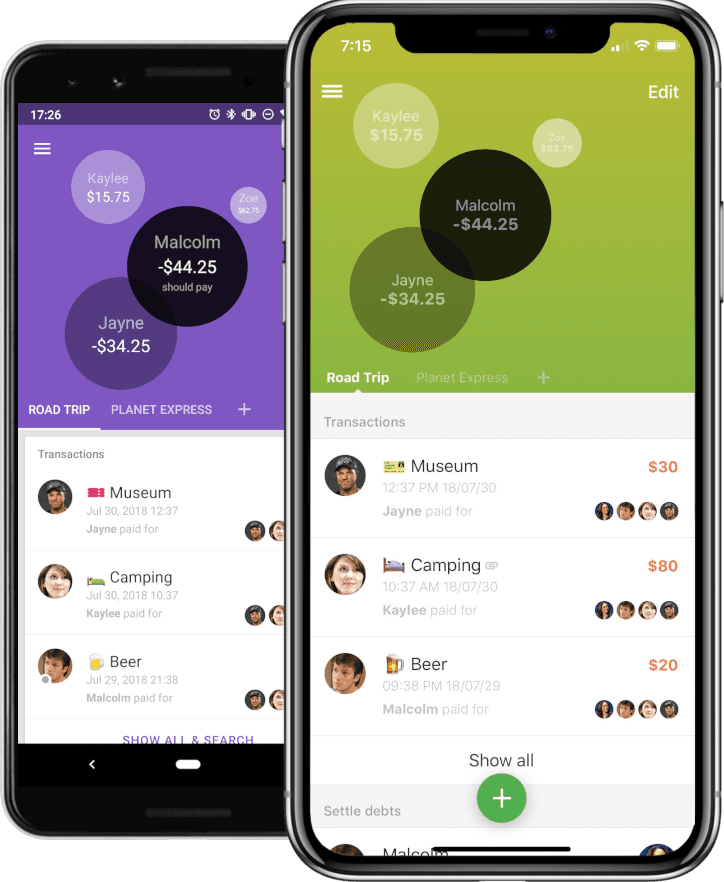
Another clean and simple UI with great colour implementation. Split payments are categorised clearly making error and confusion less likely. Consistent icon and profile photo use ensuring groups and friends are easier to locate.

Another clean and simple UI with great colour implementation. Split payments are categorised clearly making error and confusion less likely. Consistent icon and profile photo use ensuring groups and friends are easier to locate.

Summary

Home

Fix hierarchy and navigation

Consider features

All non-neutral colours do not meet accessibility standards

Activity

Text hierarchy is messy

Confusing layout

Missing features like filters

Split Costs

Improve efficiency and feature set

Fix button visibility

Improve functionality and discard free limits

Friend Profile

Messy UI

Too much text and colour

Settle Up isn’t well considered

B

Mood Board
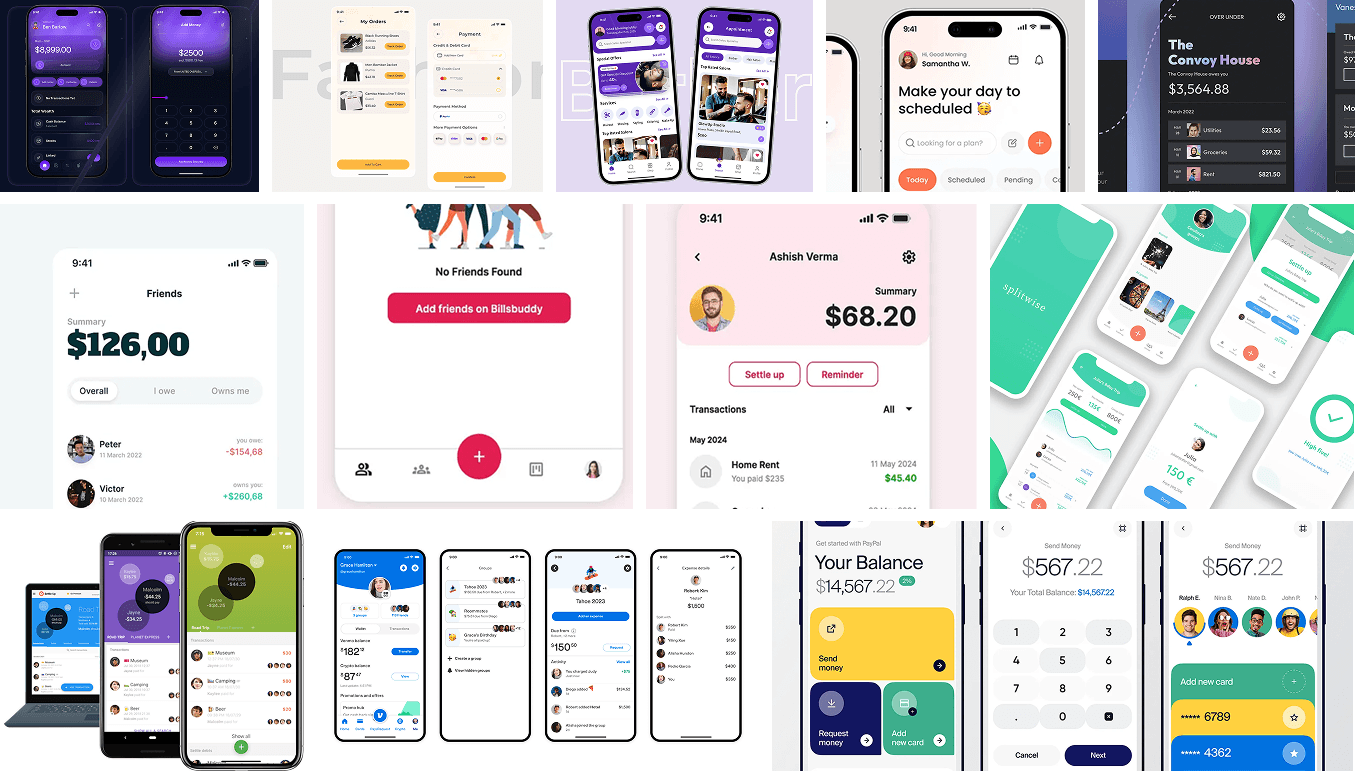
Contracture

Scenario

A redesign of Splitwise UI and colour scheme

Concept of Experience

An effortless and casual handshake between friends in the digital age

Adjectives

Balanced / Fresh / Orderly / Airy

Visual Style

Flat / Contemporary / Neutral

Sketches
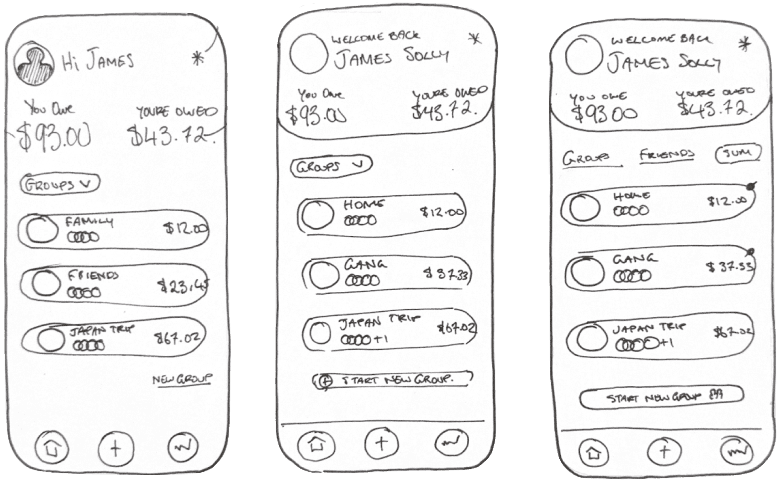
Reducing Visual Clutter

Reducing Visual Clutter

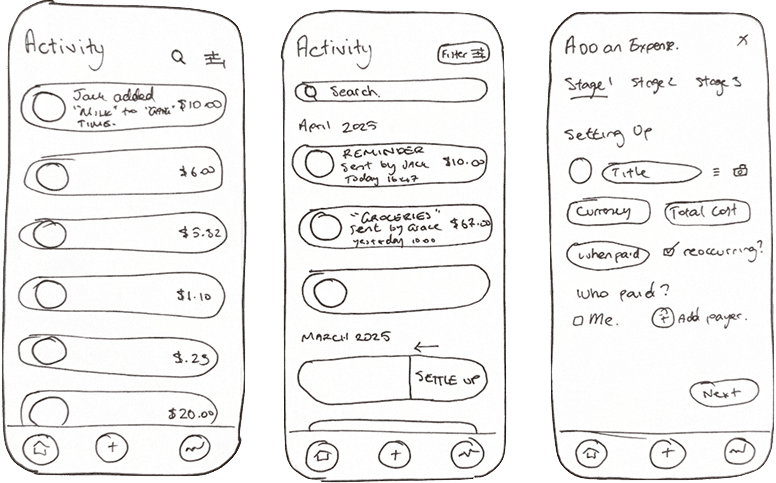
Both the activity page and a friend’s profile page have been refreshed and decluttered. The layout now has a clearer hierarchy, with more focus on icons and profile photos. Text is used more sparingly, creating a cleaner and more consistent design.

Both the activity page and a friend’s profile page have been refreshed and decluttered. The layout now has a clearer hierarchy, with more focus on icons and profile photos. Text is used more sparingly, creating a cleaner and more consistent design.

Less Text Heavy

Less Text Heavy

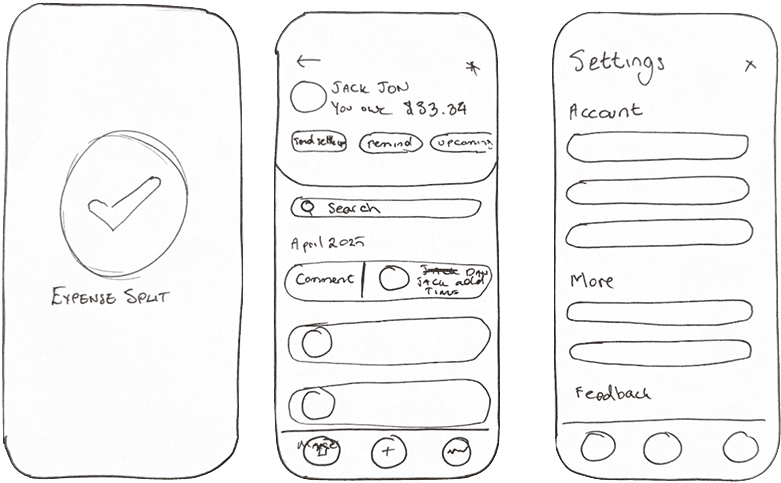
Now users can gain an indication of owing and owe much easier, and the use of colours will make better. Each expense card has been simplified to retain only the important details.

Now users can gain an indication of owing and owe much easier, and the use of colours will make better. Each expense card has been simplified to retain only the important details.

Improved Activity Page

Improved Activity Page

The activity page is now much clearer, with new features like filtering by date, people, and more. A search bar has also been added for easier navigation

The activity page is now much clearer, with new features like filtering by date, people, and more. A search bar has also been added for easier navigation

Improved UI

Improved UI

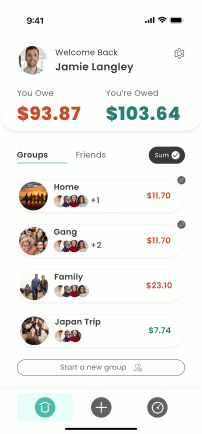
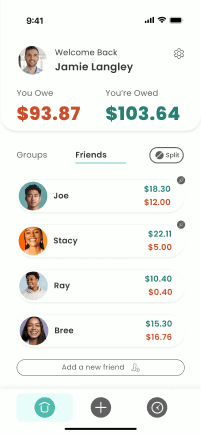
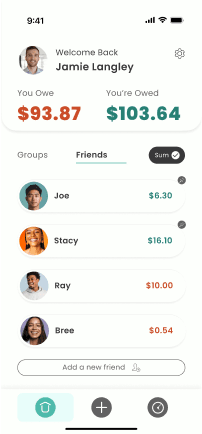
The profile has been moved to the top, and groups and friends are now combined, with the total owing reflecting both. This makes it easier to quickly see who owes what. Additionally, the previously hidden “smart” features are now easier to access, with expense differences shown directly on the home page.

The profile has been moved to the top, and groups and friends are now combined, with the total owing reflecting both. This makes it easier to quickly see who owes what. Additionally, the previously hidden “smart” features are now easier to access, with expense differences shown directly on the home page.

Reduced Splitting Fustration

Reduced Splitting Fustration

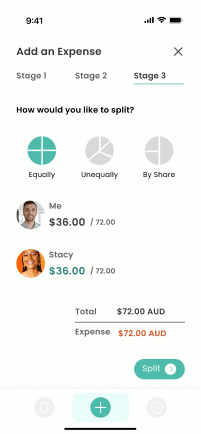
Although adding an expense now takes a few more steps, the process is much more intuitive thanks to its division into clear, logical stages. Stage 1 covers when and what, Stage 2 focuses on who, and Stage 3 handles how. Each stage highlights the most important features while maintaining a consistent and cohesive design.

Although adding an expense now takes a few more steps, the process is much more intuitive thanks to its division into clear, logical stages. Stage 1 covers when and what, Stage 2 focuses on who, and Stage 3 handles how. Each stage highlights the most important features while maintaining a consistent and cohesive design.

Improved Settings

Improved Settings

Swipe to preform a quick action. Swiping one way allows a user to leave a comment on an expense to ask questions for instance. Swiping the other way, halfway, allows the user to settle up for an amount and swiping the whole way quickly clear the total amount.

Swipe to preform a quick action. Swiping one way allows a user to leave a comment on an expense to ask questions for instance. Swiping the other way, halfway, allows the user to settle up for an amount and swiping the whole way quickly clear the total amount.

C

Task Flow

Settling up completely with a friend in a group. Simpler, quick, easy.

Old

Start

End

Tap Groups

Choose Group

Tap Settle Up

Choose who is getting paid

Enter Amount

Tap Save

Choose person who is paying

New

Start

End

Choose Group

Choose Who is getting paid

Swipe to Settle Up on Profile

Adding an expense based on shares. No room for error or frustration.

Old

Start

End

Tap the plus icon

Enter description

Enter amount

Tap more options

Tap based on shares

Enter Share amounts individually

Enter Share amounts

Tap Save

Tap pay options

New

Start

Tap the plus icon

Enter description

Enter amount

Tap people who paid (just you for quick option)

Tap people who paid

Tap Next

Tap Next

Choose by shares

Enter shares

Tap Split

Choose who to pay with

End

D

Main Screens

Old Home
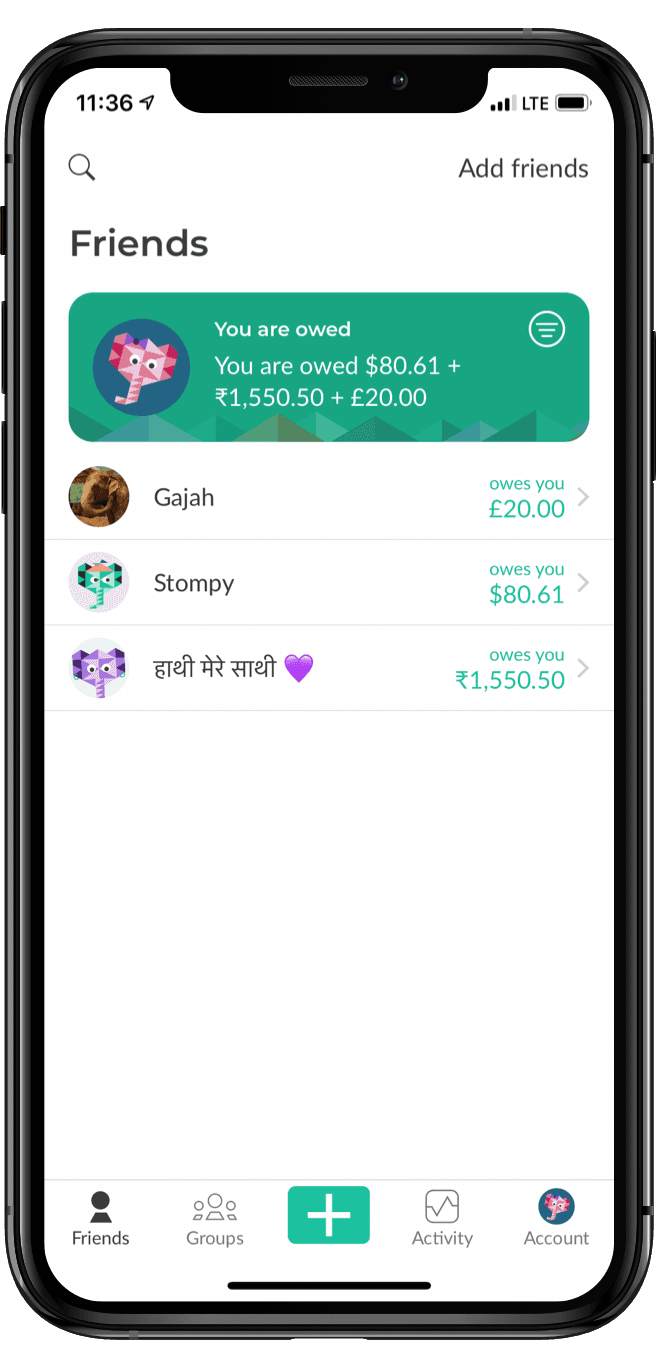
New Home
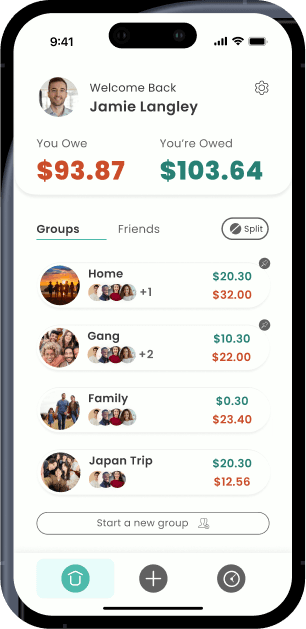
Simple and clear owings

Friends and groups on the same page for clearer total owing

Accessible colours of WCAG 4.5 or higher

Old Activity
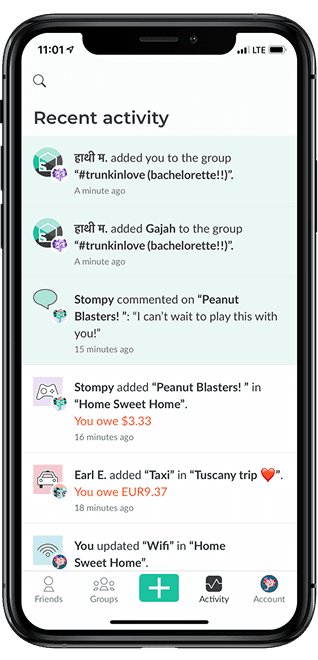
New Activity
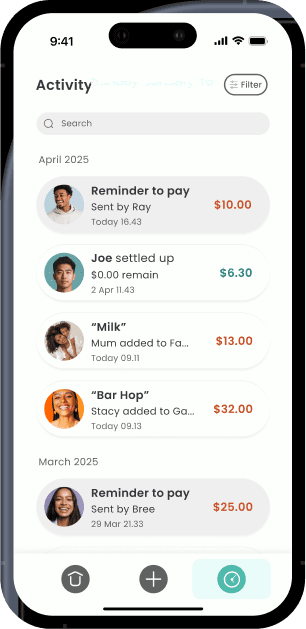
Added search and filters

Clearer hierarchy and less clutter

Simplified navigation

Old Expense
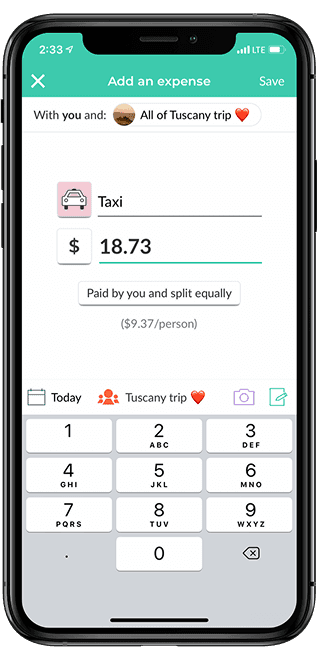
New Add Expense
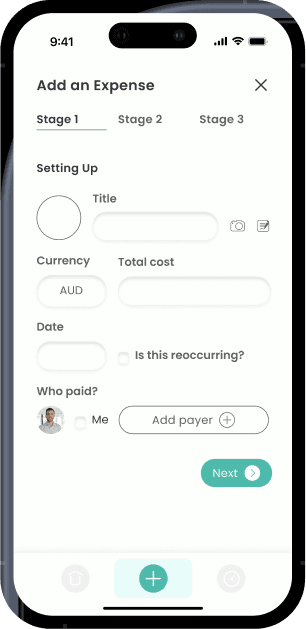
Separated stages for clear user input

Adding and raising importance of features

Increasing usability and reduces confusion

Old Profile
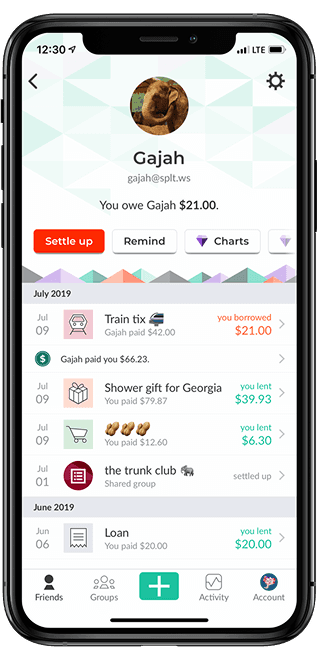
New Profile
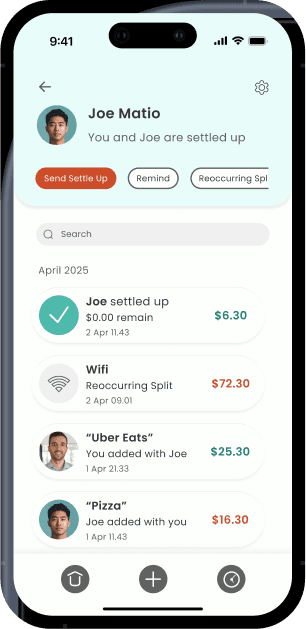
Modernised UI

Added features like Send Settle Up, Reminders, Upcoming Payments, Search, and Swipe to Settle Up

Clear card hierarchy

Old Settings
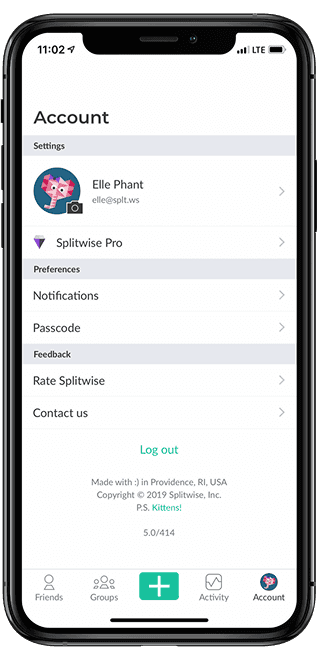
New Settings
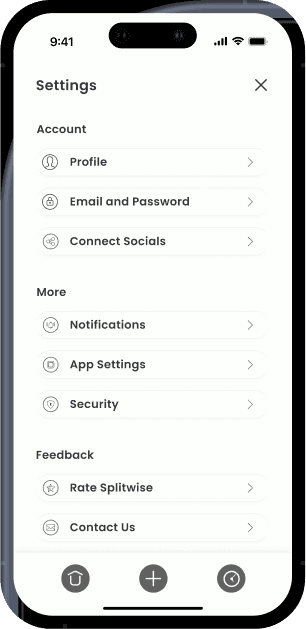
Increasing readability and improved categorisation

Consistent icons across app

Other Screens
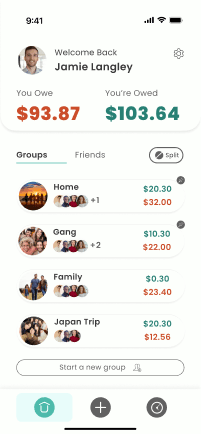
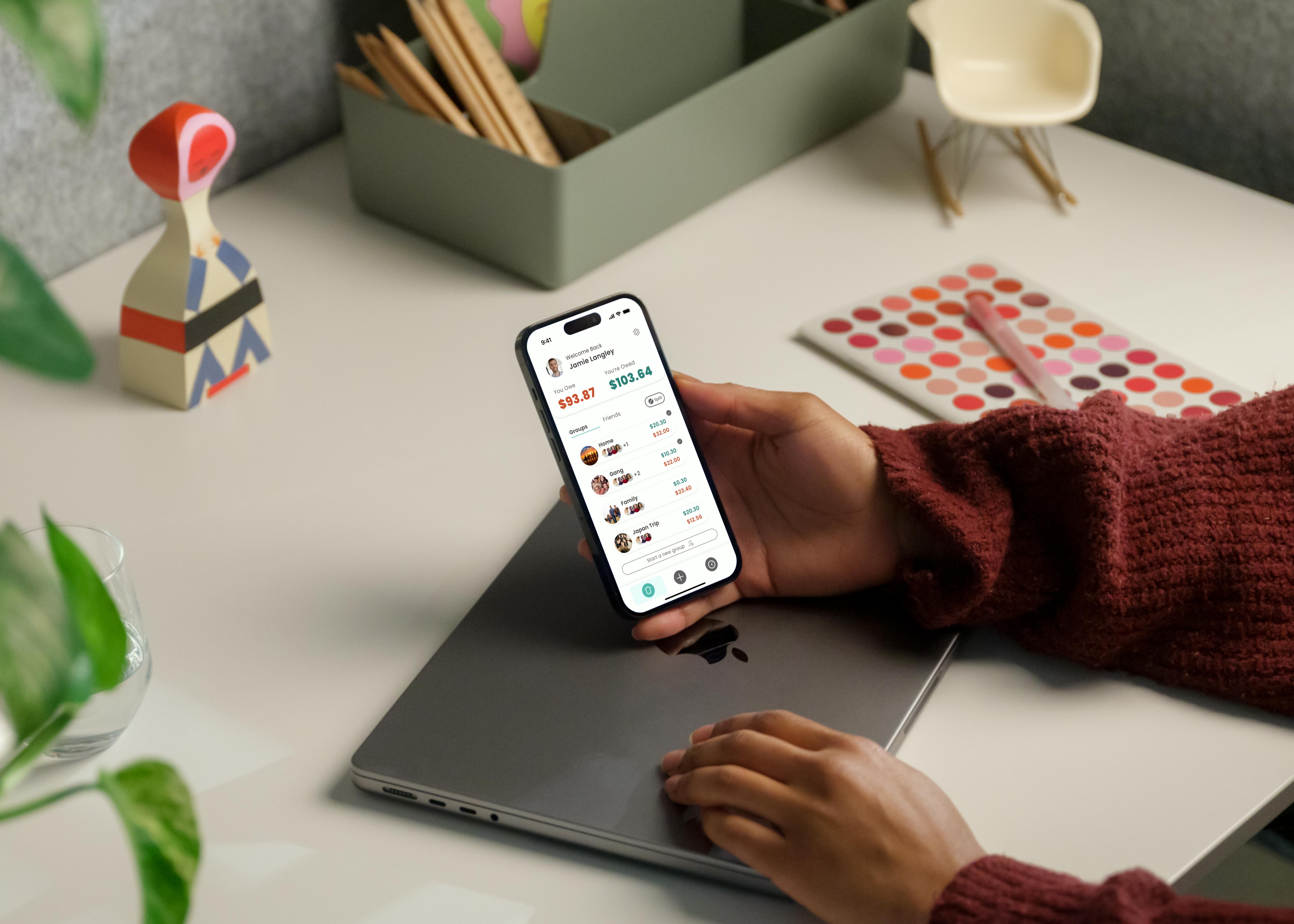
Having groups and friends on the same page with an easy toggle allows a clearer understanding of total owing. Also, the addition of a split / sum button allows users to quickly toggle the previously hidden “simplify debts” feature.
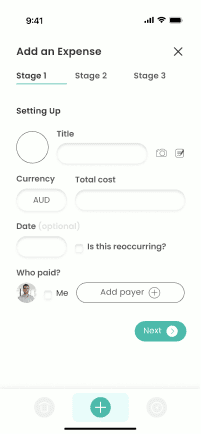
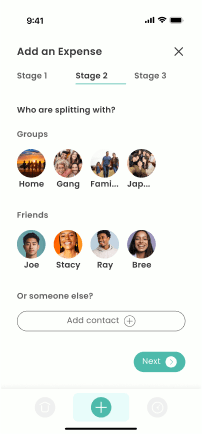
Showcasing the full new split costs user flow. Here were can see how simple each page is in it’s effort to reduce error and frustration between people.
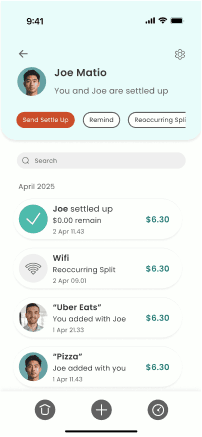
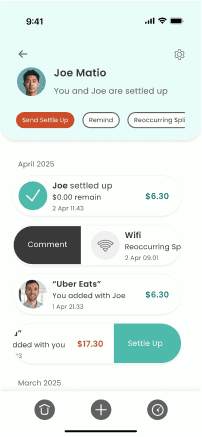
Here I am displaying the quick swipe features allowing users to quickly pay off individual debts rather than the lengthier settle up process. Also the feature of send settle up allows the owed recipient to accept a settle up once they have received actual payment.

Prototype

9:41

Reflection
What have I learnt?

What have I learnt?

Many popular apps are primarily function-driven, with limited attention to user flow, accessibility, or simplicity. For example, while Splitwise effectively fulfils its core purpose, it lacks broader usability considerations for a diverse user base. Through methods such as visual analysis, user feedback, and competitor benchmarking, I’ve learned that there are always opportunities to enhance an app. These improvements can significantly boost functionality, increase user engagement, and deliver value to both users and the business.

Many popular apps are primarily function-driven, with limited attention to user flow, accessibility, or simplicity. For example, while Splitwise effectively fulfils its core purpose, it lacks broader usability considerations for a diverse user base. Through methods such as visual analysis, user feedback, and competitor benchmarking, I’ve learned that there are always opportunities to enhance an app. These improvements can significantly boost functionality, increase user engagement, and deliver value to both users and the business.

What would I do next?

What would I do next?

Beyond rehauling the app based on my proposed visual style, I would conduct in-depth user testing—specifically methods like the five-second test and scenario-based testing. These approaches would reveal whether the app is usable, intuitive, and capable of supporting task completion efficiently, providing clear direction for further design improvements. Given time constraints, I would also explore alternative visual styles to achieve a bolder and more impactful aesthetic. Additionally, enhancing other brand touchpoints such as the logo, website design, and premium feature offerings would help maximise the overall business model and user experience.

Beyond rehauling the app based on my proposed visual style, I would conduct in-depth user testing—specifically methods like the five-second test and scenario-based testing. These approaches would reveal whether the app is usable, intuitive, and capable of supporting task completion efficiently, providing clear direction for further design improvements. Given time constraints, I would also explore alternative visual styles to achieve a bolder and more impactful aesthetic. Additionally, enhancing other brand touchpoints such as the logo, website design, and premium feature offerings would help maximise the overall business model and user experience.

Why is a change like this important?

Why is a change like this important?

Designing an app that serves a broader community should always be a core objective. Reaching more users and supporting them with robust features delivered through a simple, intuitive, and modern interface not only strengthens business operations but also enhances the daily lives of those who rely on tools like Splitwise. Redesign is not just about updating aesthetics—it’s about pushing the boundaries of design to inspire competition, elevate industry standards, and ultimately contribute to a better-designed society. A successful redesign must be grounded in human-centred design principles, ensuring that real user needs, behaviours, and contexts drive every decision. This approach is essential to create solutions that are not only functional, but genuinely meaningful and inclusive. It involves balancing current trends with innovation, always keeping the user at the centre. A successful redesign ensures that tasks are easy to complete while making the experience enjoyable, engaging, and meaningful. It's a continuous pursuit of creating tools that are not only functional but also delightful to use.

Designing an app that serves a broader community should always be a core objective. Reaching more users and supporting them with robust features delivered through a simple, intuitive, and modern interface not only strengthens business operations but also enhances the daily lives of those who rely on tools like Splitwise. Redesign is not just about updating aesthetics—it’s about pushing the boundaries of design to inspire competition, elevate industry standards, and ultimately contribute to a better-designed society. A successful redesign must be grounded in human-centred design principles, ensuring that real user needs, behaviours, and contexts drive every decision. This approach is essential to create solutions that are not only functional, but genuinely meaningful and inclusive. It involves balancing current trends with innovation, always keeping the user at the centre. A successful redesign ensures that tasks are easy to complete while making the experience enjoyable, engaging, and meaningful. It's a continuous pursuit of creating tools that are not only functional but also delightful to use.

REACH OUT TO ME

REACH OUT TO ME

Create a free website with Framer, the website builder loved by startups, designers and agencies.